
⭐ eWeb Loyalty & Tiered Rewards
The zero-friction VIP loyalty and rewards program for OpenCart 3.x and 4.x. Modeled after Sephora Beauty Insider / Smile.io / Rivo — non-expiring lifetime spend tiers (Insider, VIB, Rouge), a frictionless slider checkout redemption, exclusive points-only reward items, and an account rewards hub.
1.1 Overview & Key Features
- Lifetime Spend VIP Tiers — non-expiring Insider (1.0x) → VIB (1.5x) → Rouge (2.0x).
- 5-Step Interactive Setup Wizard — auto-detects AOV, APP, and store currency; recommends tier thresholds with smart rounding.
- Dynamic Special & Bulk Discount Points — points to buy and points earned automatically follow effective promo pricing.
- Native Order Total Engine — AJAX checkout slider for both OC3 and OC4 (Default theme, Journal 3, and custom themes).
- Bulk Product Points Setup — populate
oc_product_rewardandoc_product.pointsfor active or all products in one click. - Per-Customer-Group Rules — enable/disable rewards per customer group and set custom group base earning rates.
- Central eWeb Dashboard — real-time KPI cards, interactive Tier Architect, Customer Lookup, Ledger Feed, and Order Info Loyalty Card.
1.2 System Requirements & Compatibility
| Platform | Supported Versions | PHP Compatibility |
|---|---|---|
| OpenCart 3.x | 3.0.2.0 – 3.0.5.1+ | PHP 7.1 – 8.3 |
| OpenCart 4.x | 4.0.2.0 – 4.1.0.4+ | PHP 8.0 – 8.3 |
| Journal 3 Theme | Journal 3.1.x / 3.2.x+ | 100% Compatible (Admin & Storefront) |
src/ adhere to a clean PHP 7.1 static baseline (no typed properties, no union types, no arrow functions).1.3 Installation & Updating Best Practices
OpenCart 3.x Installation
- Upload
eweb_rewards.ocmod.zipvia Extensions → Installer. - Go to Extensions → Modifications and click Refresh.
- Navigate to Extensions → Modules, locate eWeb Loyalty & Tiered Rewards, and click Install.
- Click Edit to enter the Central eWeb Dashboard and launch the Setup Wizard.
OpenCart 4.x Installation
- Upload
eweb_rewards.ocmod.zipvia Extensions → Installer. - Navigate to Extensions → Modules and click Install.
SchemaMigrator::ensureColumns()). Your loyalty ledger, customer point balances, and tier configuration are preserved permanently.1.4 Licensing & Activation
Distributed through the OpenCart.com Marketplace. After purchase, enter your purchase code in Essential Settings → License Key. The extension operates completely offline in Docker/local environments; license validation only takes place when visiting the admin settings.
| Edition | Pricing | Includes |
|---|---|---|
| Self-Hosted | $19.00 one-time | Full source code, 12 months updates & marketplace support |
| Cloud Hosted | $14.99/mo | Pre-configured on eWeb-hosted stores with zero-maintenance updates |
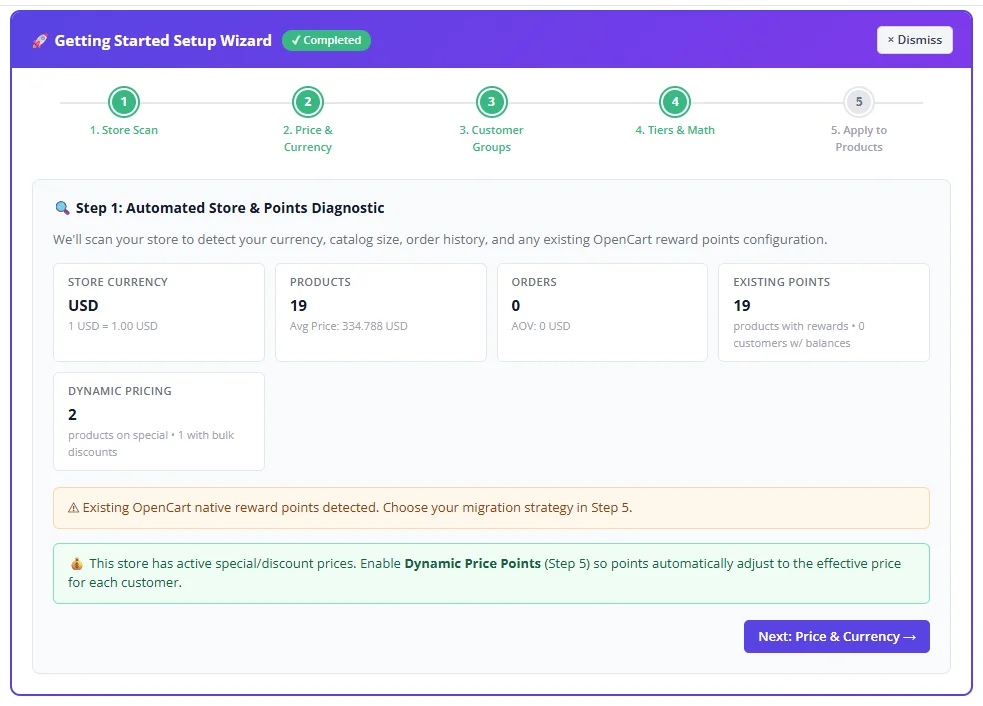
2.1 Step 1 — Store & Existing Points Diagnostic
Click "Run Store Scan" on the Setup Wizard panel. The server performs an automated health scan covering:
- Store base currency and live USD exchange rate (via
open.er-api.com→ CDN fallback →oc_currencytable → offline static dictionary for 60+ currencies). - Enabled product count, inactive product count, and Average Product Price (APP).
- Completed order count and Average Order Value (AOV) from award-status orders.
- Existing native reward points — scans
oc_product_reward,oc_product.points, andoc_customer_reward. - Customer groups — discovered from
oc_customer_group_descriptionand merged with saved rules. - Dynamic pricing check — detects active special prices and bulk quantity discount tiers.
2.2 Step 2 — Currency Calibration & Exchange Rate API
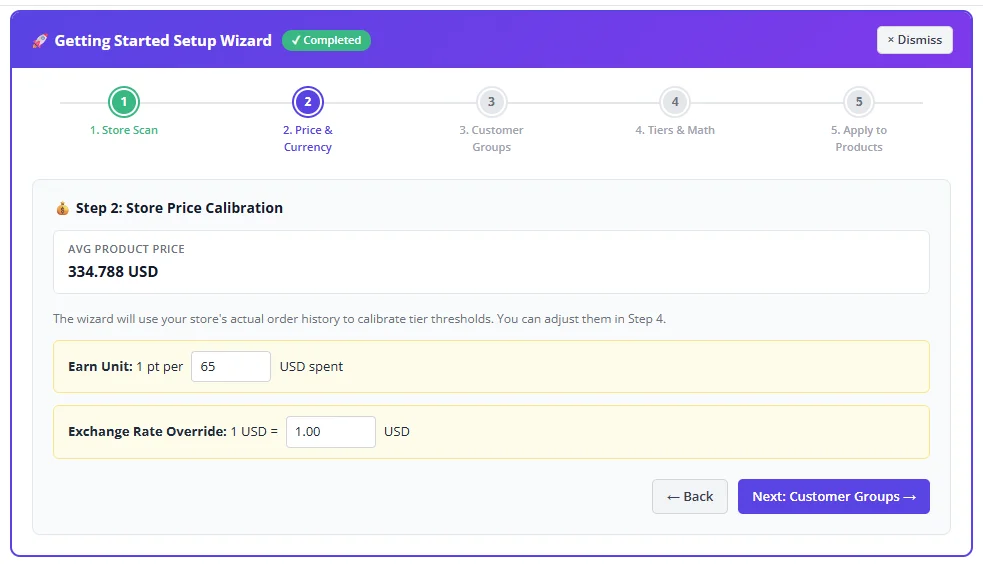
If the store already has orders (AOV > 0) or products (APP > 0), the wizard shows the detected values and lets you confirm or override them. For brand-new stores, four price range cards are shown — automatically converted to your store's currency:
| Bucket | USD Range | Example in PKR (1 USD = 280) | Synthetic Midpoint |
|---|---|---|---|
| Budget / Everyday | $0–$10 | 0 – 2,800 PKR | 1,400 PKR |
| Standard Retail | $10–$25 | 2,800 – 7,000 PKR | 4,900 PKR |
| Mid-Ticket | $26–$100 | 7,000 – 28,000 PKR | 16,800 PKR |
| High-Ticket / Luxury | $101+ | 28,000+ PKR | 42,000 PKR |
2.3 Step 3 — Customer Group Rules & Multi-Group Setup
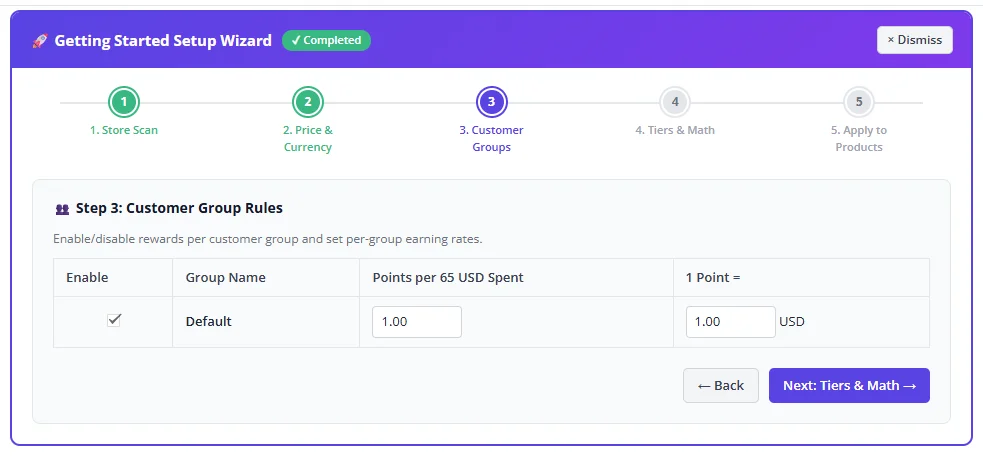
For each OpenCart Customer Group discovered in oc_customer_group_description:
- Enable / Disable rewards for that group (disabled groups are excluded from point earning, redemptions, and teaser widgets).
- Base Points per Earn Unit — default
1.0(e.g., 1 pt per 100 currency units). Wholesale groups may use0.5; VIP retail groups may use2.0. - Redemption Rate — default
1 point = 1 currency unit. Group-specific rates override the global setting at checkout.
2.4 Step 4 — Smart Lifetime Tier Thresholds (AOV & APP Math)
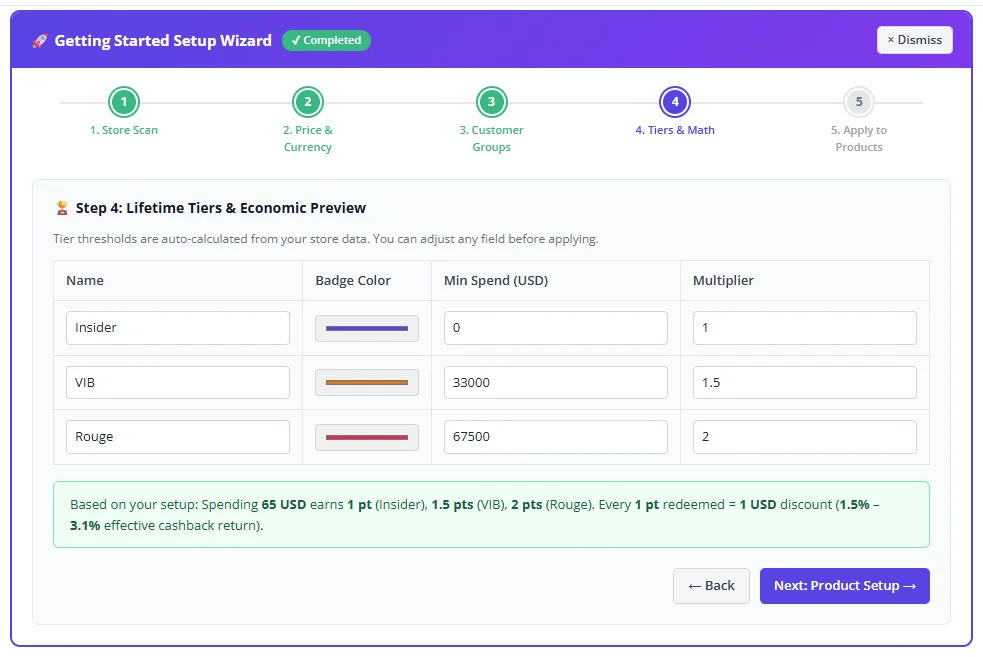
If AOV > 0:
VIB = roundSmart(50 × AOV) Rouge = roundSmart(100 × AOV)If APP > 0 & AOV = 0:
VIB = roundSmart(100 × APP) Rouge = roundSmart(200 × APP)Cold start: Uses the selected bucket midpoint as a synthetic APP.
roundSmart rounds numbers to clean, merchant-friendly steps based on magnitude (nearest 5, 25, 50, 100, 250, 1,000, 2,500, 5,000, 10,000, 50,000…).
2.5 Step 5 — Bulk Product Setup (Active vs. All Products)
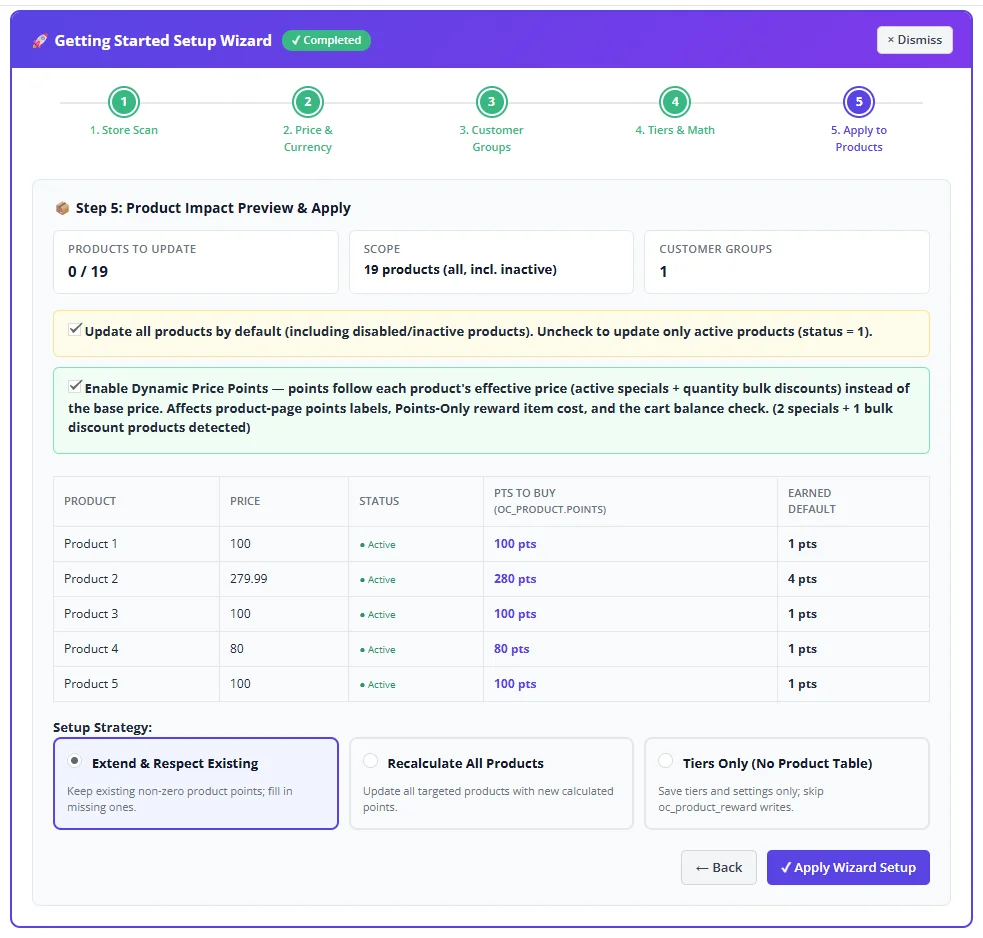
Step 5 provides a live preview of how many products will be updated and lets you select your strategy:
- Extend & Respect Existing — preserve non-zero
oc_product_reward.pointsrows; fill in missing products only. - Recalculate All Products — harmonize all targeted products with fresh calculated points.
- Tiers Only — save tier configuration without writing to product tables.
status = 0 (disabled/inactive) when populating oc_product_reward and oc_product.points so points are ready when enabled. Uncheck to update only active products (status = 1).
3.1 Admin Product #tab-reward Tab
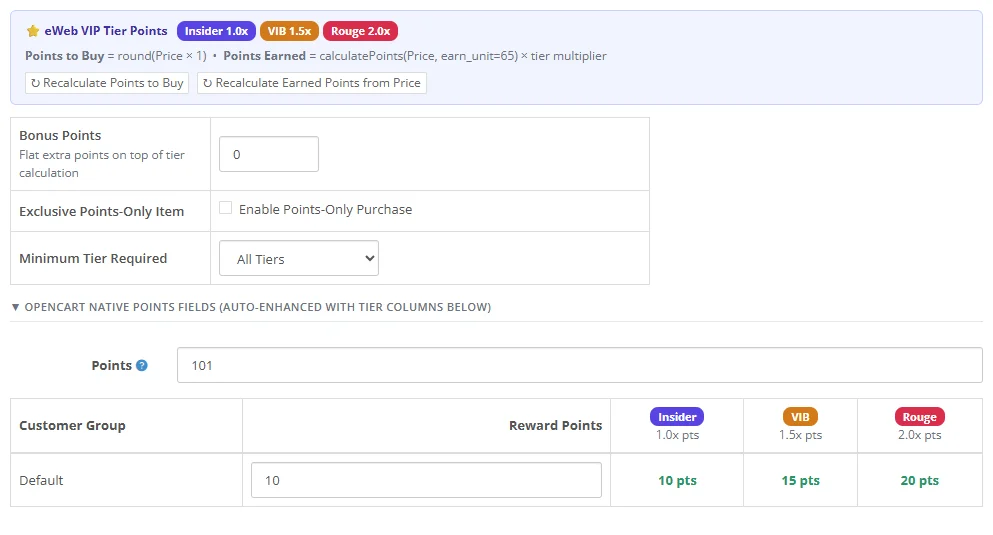
When eWeb Loyalty is active, the native OpenCart Reward Points tab ("Reward Points" / "Nagradni poeni") is upgraded in place via an inline JS DOM enhancer that seamlessly replaces the tab content without modifying core files.
The enhanced tab consists of four integrated sections:
- Section A — Points Needed to Purchase: (
input[name="points"]→oc_product.points) calculated from price. - Section B — Tiered Points Awarded Matrix: all VIP tiers × all customer groups with live dynamic updates.
- Section C — Special & Bulk Discount Points Preview: dynamic points preview when specials or bulk discounts apply.
- Section D — Exclusive Points-Only Item & Bonus Points: VIP sample items and flat bonus point controls.
3.2 Points to Buy vs. Tiered Points Earned
Points Needed to Buy (oc_product.points)
Points to Buy = round(Product Price × Redeem Points Per 1 Currency Unit)Example: Price = 2,033 RSD, Redeem Rate = 1 pt per 1 RSD → 2,033 points needed to buy.
This points price is the same for ALL VIP tiers. Whether an Insider or Rouge member, they all pay 2,033 points to purchase this product with points.
Points Earned on Purchase (oc_product_reward.points)
Points Earned = calculateProductRewardPoints(price, earnUnit, groupPPU) × tierMultiplierExample: Price = 2,033 RSD, Earn Unit = 100, Group PPU = 1.0
→ Insider (1.0x) = 20 pts | VIB (1.5x) = 30 pts | Rouge (2.0x) = 41 pts
3.3 Retail Charm Pricing Rounding (.90+ Rule)
Standard floor rounding penalizes retail-priced products (e.g., 499 RSD at 100 unit gives 4.99 → floor → 4 points instead of 5). eWeb uses the .90+ charm rounding rule:
calculateProductRewardPoints(price, earnUnit, ppu)If
(price / earnUnit × ppu) fractional remainder ≥ 0.90 → ceil()Otherwise →
floor()Result: 499 RSD / 100 × 1.0 = 4.99 → 5 pts (not 4)
| Price (RSD) | Earn Unit | Ratio | Floor | .90+ Result |
|---|---|---|---|---|
| 499 | 100 | 4.99 | 4 | 5 ✓ |
| 2,033 | 100 | 20.33 | 20 | 20 |
| 1,899 | 100 | 18.99 | 18 | 19 ✓ |
| 2,500 | 100 | 25.00 | 25 | 25 |
3.4 Dynamic Special & Bulk Discount Points System
When Dynamic Price Points is enabled (default: ON), points automatically follow the customer's effective selling price — including active Special Prices (oc_product_special) and Bulk Quantity Discounts (oc_product_discount).
Resolution Rules
- Bulk Quantity Discount: if the ordered quantity meets a discount tier, that bulk tier price is used.
- Special Price: active specials (respecting
date_startanddate_end) apply across applicable quantities. - Regular Price: baseline price used when no discount or special is active.
When a special price expires (date_end < NOW()), the points needed to buy and points earned automatically revert to regular-price calculations without any manual admin action or cron job.
Points to Buy = round(Effective Price × Redeem Rate)Points Earned = calculateProductRewardPoints(Effective Price, Earn Unit, Group PPU) × Tier Multiplier + Bonus
Worked Example (Store Currency: RSD, Earn Unit: 100, Redeem Rate: 1)
| Pricing Scenario | Effective Price | Points to Buy | Insider (1.0x) | VIB (1.5x) | Rouge (2.0x) |
|---|---|---|---|---|---|
| Regular List Price | 2,033.00 RSD | 2,033 pts | 20 pts | 30 pts | 40 pts |
| Active Special Price | 1,219.00 RSD | 1,219 pts | 12 pts | 18 pts | 24 pts |
| Bulk 5× Discount | 1,918.00 RSD/pc | 1,918 pts/pc | 19 pts/pc | 29 pts/pc | 38 pts/pc |
| Special Expired | 2,033.00 RSD | 2,033 pts | 20 pts | 30 pts | 40 pts |
3.5 Exclusive Points-Only Products & VIP Samples
Enable Exclusive Points-Only Item = Yes on any catalog product to convert it into a VIP reward item:
- Hides the currency price and displays a prominent Points Price badge (e.g., "2,033 Points — Exclusive Reward Item").
- Replaces the standard "Add to Cart" CTA with "Redeem for 2,033 Points" (for eligible members).
- Displays clear lock states for guests ("Sign in to Redeem"), under-tiered shoppers ("Exclusive to Rouge Members"), or insufficient balances ("Requires 2,033 Points (You have 1,200)").
The Minimum Tier restriction (All / Insider+ / VIB+ / Rouge Only) and balance requirement are enforced on the server via eventCartAddBefore.
3.6 Storefront Product Page Teaser Widget
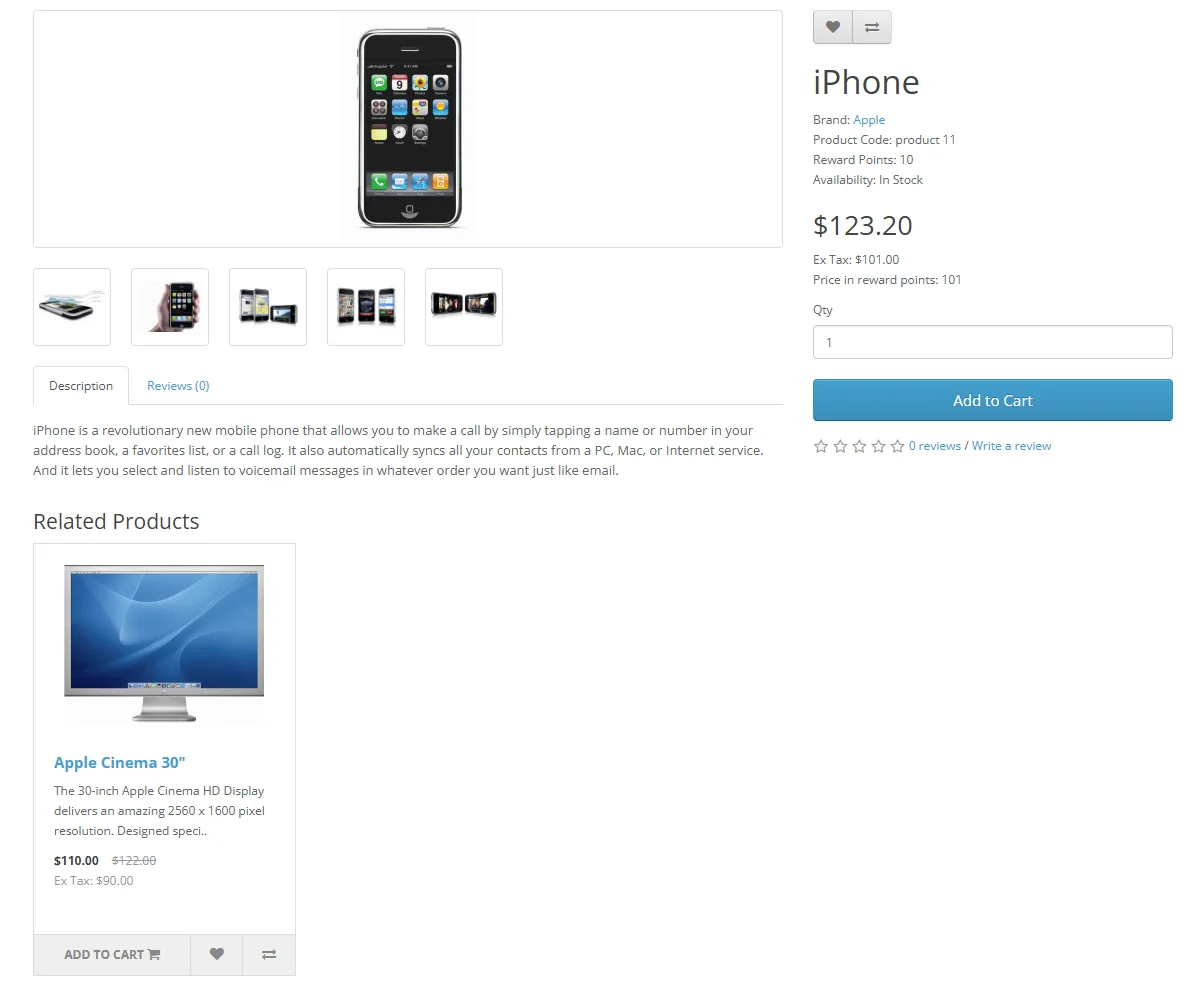
When Show Product Teaser is enabled, an earning teaser is injected into the product page via catalog/view/product/product/after:
- Guest Visitor: "Earn 20 points on this purchase — Sign in for VIP multipliers"
- Logged-in Insider: "As an Insider member, you'll earn 20 pts"
- Logged-in VIB: "As a VIB member, you'll earn 30 pts"
- Logged-in Rouge: "As a Rouge member, you'll earn 41 pts"
4.1 AJAX Checkout Slider (Default & Journal 3)
The points redemption slider widget is automatically injected into the Cart (checkout/cart) and Checkout (checkout/checkout) pages. It features:
- Customer's Tier Badge and Available Balance.
- Interactive Range Slider + Numeric Input from 0 to the maximum redeemable points.
- Apply Max and Clear buttons with instant AJAX calculation (no full page reload).
- Full compatibility with Default OpenCart Checkout and Journal 3 One-Page Checkout.
4.2 Hybrid Order Total Engine & Tax Adjustment
The companion total/eweb_rewards order total line item reduces the order subtotal. When tax_redemption_adjustment is enabled (default: ON), tax line items are proportionally adjusted so sales tax accurately reflects the discounted cart value.
4.3 Order Status Transitions (Earn, Redeem, Revoke, Restore)
| Order Transition | Action Executed | Ledger Entry |
|---|---|---|
| Order → Awarding Status (e.g., Complete, Shipped) | Award earned points based on net spend and VIP tier multiplier | oc_eweb_rewards_ledger type=earn |
| Points applied at checkout → Non-revoking status | Deduct redeemed points from customer balance | type=redeem |
| Order → Revoking Status (Cancelled, Refunded) | Revoke earned points; Restore redeemed points to customer balance | type=revoke / restore |
All state transitions are strictly idempotent — re-saving or transitioning through the same status multiple times never duplicates transactions.
4.4 Admin Order Info Loyalty Card
Injected into the Admin Order Info page via admin/view/sale/order_info/after, showing the customer's current VIP tier, lifetime spend, points earned on this order, points redeemed, and a complete transaction history.
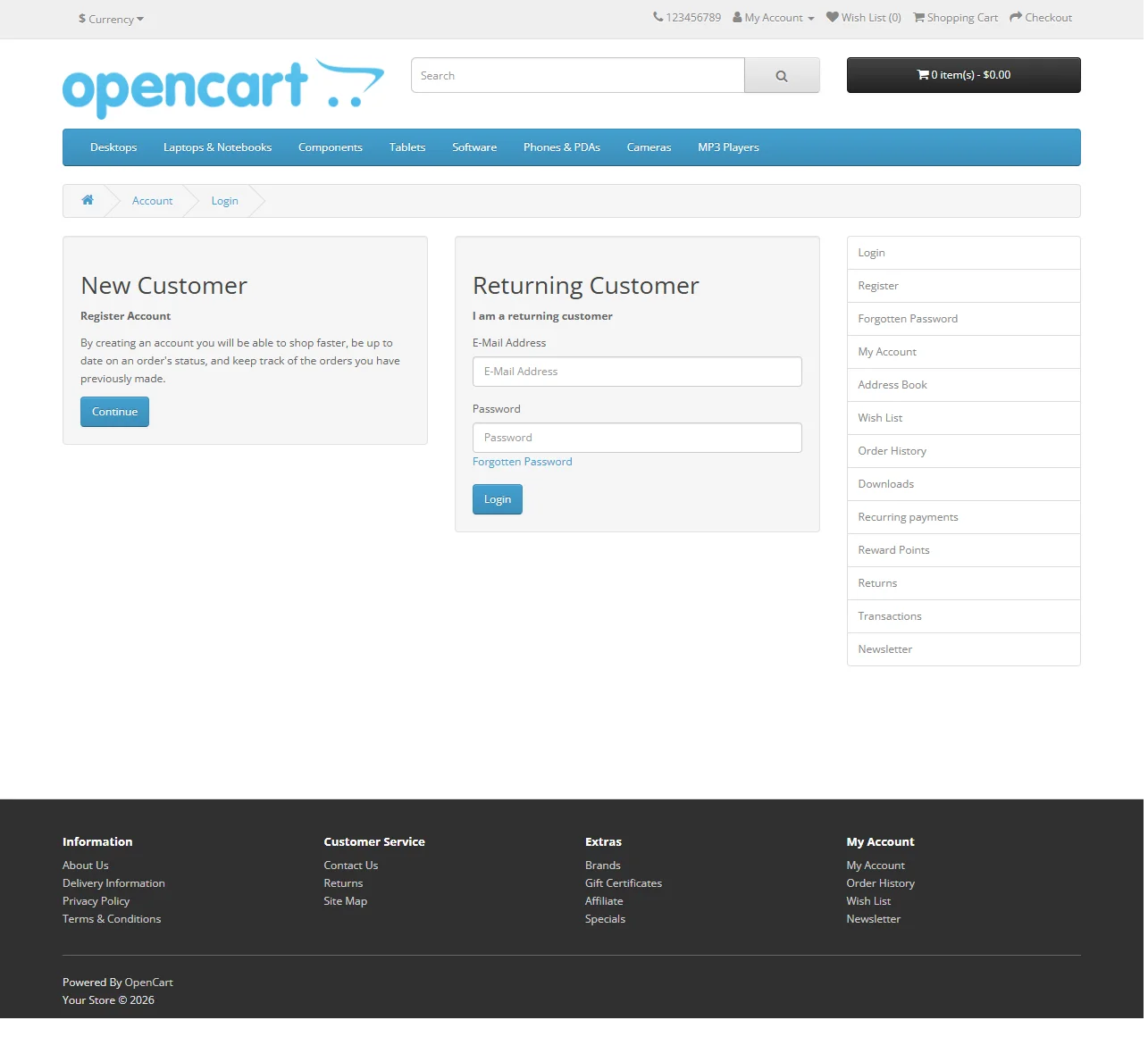
5.1 Customer Rewards Hub (account/eweb_rewards)
Accessible directly via index.php?route=account/eweb_rewards (aliased via event hook):
- Hero Tier Status Card — VIP tier badge, point balance, cash redemption value, active earning rate.
- Animated Next-Tier Progress Bar — visual progress showing spend needed to unlock the next tier.
- All Tiers Comparison Strip — 3-column breakdown of Insider, VIB, and Rouge benefits.
- Exclusive Points-Only Catalog Showcase — grid of exclusive VIP items redeemable directly with points.
- Paginated Transaction Ledger — complete history with color-coded status badges.
5.2 Central Dashboard KPIs & Tier Architect
The Central eWeb Dashboard provides real-time visibility into your loyalty program:
- KPI Cards: Total Loyalty Members, Points in Circulation, Points Redeemed, and Tier Distribution Breakdown.
- Interactive Tier Architect: edit Insider, VIB, and Rouge thresholds, multipliers, badge colors, and sort orders with a live Effective Cashback Return % calculator.

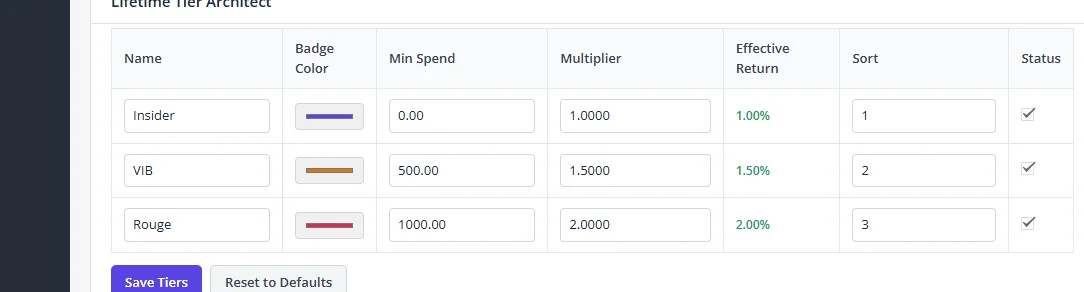
5.3 Customer Lookup, Manual Adjustments & Historical Spend Sync
Search any customer by name, email, or ID to inspect their loyalty status:
- Manual Point Adjustment: credit or debit points with a mandatory audit reason (logged to
oc_eweb_rewards_ledgerandoc_eweb_activity). - 1-Click Historical Spend Sync: recalculates lifetime spend from past completed orders and upgrades the customer's tier automatically.

5.4 Storefront Transaction Ledger Feed
Displays an immutable, filterable feed of every point transaction across the entire store with customer ID, event type, points credited/debited, order reference, and timestamp.

6.1 Action & Filter Hooks Reference
| Hook Tag | Type | Description |
|---|---|---|
eweb/rewards/points_earned | Filter | Modify calculated earned points before crediting. Args: $points, [order_id, customer_id, tier] |
eweb/rewards/customer_tier | Filter | Override computed tier. Args: $tierResult, [customer_id, lifetime_spend] |
eweb/rewards/redemption_validation | Filter | Customize checkout redemption validation rules. |
eweb/rewards/points_credited | Action | Fires when points are credited. Payload: [customer_id, order_id, points, new_balance, type] |
eweb/rewards/points_redeemed | Action | Fires when points are redeemed or revoked. |
eweb/rewards/tier_upgraded | Action | Fires on tier promotion. Payload: [customer_id, old_tier_id, new_tier_id, lifetime_spend] |
// Example: Add 10% bonus points to all orders over $200
use Eweb\Core\Hooks;

Hooks::addFilter('eweb/rewards/points_earned', function ($points, $context) {
    $orderInfo = ...; // load from $context['order_id']
    if (!empty($orderInfo['total']) && (float)$orderInfo['total'] > 200) {
        return (int)round($points * 1.10);
    }
    return $points;
}, 10, 'my_custom_rewards');
6.2 Database Tables Architecture
| Table Name | Description & Role |
|---|---|
oc_eweb_rewards_tier | VIP tier definitions (name, badge_color, min_spend, multiplier, sort_order) |
oc_eweb_rewards_customer | Per-customer point balance, lifetime_spend, current_tier_id, total_earned, total_redeemed |
oc_eweb_rewards_ledger | Immutable audit ledger (earn, redeem, revoke, restore, adjust) with order ID and balance snapshots |
oc_eweb_rewards_product | Per-product settings (is_points_only, points_price, min_tier_id, bonus_points) |
oc_product.points | Native OpenCart column — Points Needed to Buy (Section A) |
oc_product_reward | Native OpenCart table — Base points earned per customer group (Section B) |
6.3 FAQ & Troubleshooting
Why did early builds show a permissions error on admin actions?
OpenCart requires extensions to register action routes with user group permissions. Ensure your admin user group has modify permissions enabled for extension/module/eweb_rewards (OC3) or extension/eweb_rewards/module/eweb_rewards (OC4).
Points not awarding after order completes
- Verify that
award_order_statusesin Advanced Settings matches the status ID your store sets for completed orders (default:3= Shipped,5= Complete). - Check that the customer's Customer Group is enabled in the Customer Group Rules setting.
- Ensure OpenCart's order history event hooks are active in the Events tab.
Journal 3 theme compatibility
eWeb Loyalty is built without jQuery dependencies and uses vanilla JavaScript for the checkout slider and product teasers. The #tab-reward enhancer fires on both DOMContentLoaded and a 300ms deferred pass to integrate smoothly with Journal 3's lazy tab rendering.
► Live Rewards & Tier Calculator Sandbox
Interactive Pricing & Points Calculator
Test how regular prices, special prices, and bulk quantity discounts translate into Points to Buy and Points Earned across all VIP tiers in real time.
| Scenario | Formula | Points to Buy | Insider (1.0x) | VIB (1.5x) | Rouge (2.0x) |
|---|